
Broadcast & Automation Campaign Analytics
MailFuz Pro provides enterprise-grade deliverability and engagement analytics for all Broadcast Newsletters and Marketing Automations, comparable to leading commercial email platforms such as Twilio SendGrid and Postmark.
Real-Time Email Tracking Telemetry
Section titled “Real-Time Email Tracking Telemetry”Navigate to WP-Admin → MailFuz → Email Tracking (admin.php?page=mailfuz-tracking):
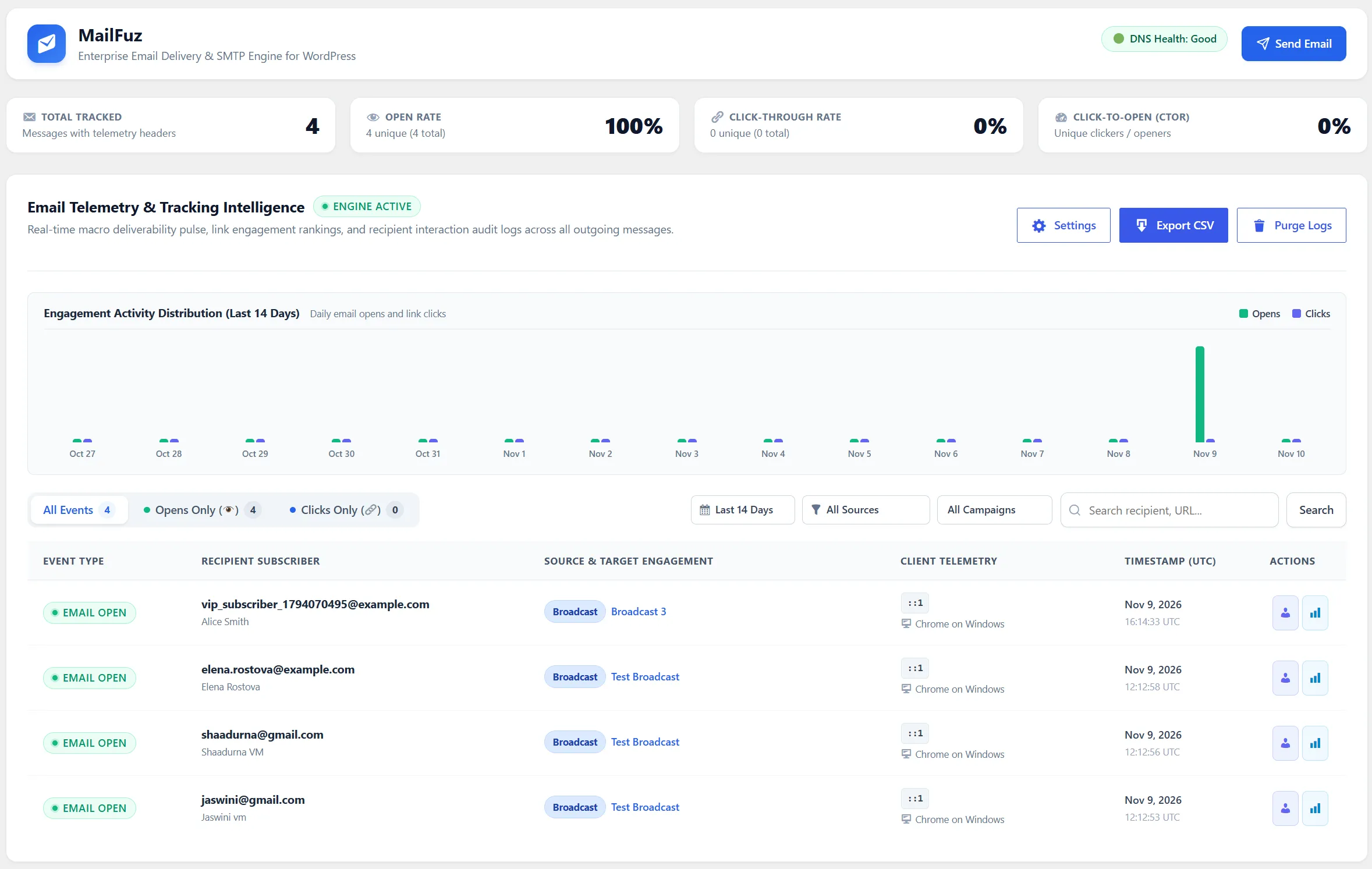
Live Engagement Stream
Section titled “Live Engagement Stream”- Event Type: Visual badges differentiating OPEN events from CLICK events.
- Target Recipient: Subscriber who interacted with the transmission.
- Target Link / URL: For click events, records the exact destination link clicked.
- Device & User-Agent: Parsed client information (Desktop, Mobile, Apple Mail, Chrome, Outlook).
- IP & Location: Masked or full IP address for geographic delivery insights.
- Precise Timestamp: Exact time of recipient interaction down to the second.
Executive Deliverability KPI Dashboard
Section titled “Executive Deliverability KPI Dashboard”When opening any campaign report under MailFuz → Broadcasts → Stats, the dashboard displays 7 high-impact metric cards:
| Metric Card | Definition & Insights |
|---|---|
| Total Delivered | Total recipients successfully reached with a 100% deliverability baseline. |
| Seen / Opened | Unique recipient count, overall Open Rate (%), and total cumulative opens. |
| Total Clicks | Unique clickers, Click-Through Rate (CTR %), and total link click events. |
| Unread / Unopened | Total recipients who received the message but have not yet opened it. |
| Bounces / Undelivered | Dispatches that failed or bounced, automatically shielded from future sends. |
| Unsubscribed | Direct unsubscribes recorded via RFC 8058 one-click list headers or web links. |
| Spam Complaints | Direct feedback loop spam reports received from mailbox providers. |
Visual Engagement Funnel
Section titled “Visual Engagement Funnel”Directly beneath the executive KPI cards, an interactive engagement progress bar visualizes the full conversion lifecycle:
- Delivered (100%) → Seen / Opened (X%) → Clicked Links (Y%) → Unopened (Z%).
Recipient-Level Detailed Drilldown
Section titled “Recipient-Level Detailed Drilldown”The report table provides granular telemetry on every individual contact targeted by the campaign:
Segmented Filter Tabs
Section titled “Segmented Filter Tabs”- All Recipients: Master dispatch log for this blast.
- Seen (Opened): Contacts who have viewed the message, with exact timestamps (
First Opened&Last Opened). - Unread: Contacts who have not opened the transmission yet.
- Clicked: Contacts who interacted with hyperlinks inside the email body.
- Bounces / Failed: Contacts with delivery errors.
- Unsubscribed: Contacts who opted out during or after this blast.
Instant Search & CSV Export
Section titled “Instant Search & CSV Export”- Search: Instantly filter recipients by email, first name, or last name.
- Export Recipient CSV: One-click download of the complete recipient audit log with read states, timestamps, and click counts for offline CRM ingestion or compliance records.