
Gutenberg Subscription Form Block & Shortcodes
MailFuz Pro provides high-converting, embeddable Subscription Forms for capturing newsletter signups, lead magnets, and customer consent anywhere on your WordPress site.
Forms feature real-time AJAX submission without page reloads, invisible anti-bot honeypots, list routing, automatic tag assignment, and GDPR compliance toggles.
1. Native Gutenberg Block (MailFuz Subscription Form)
Section titled “1. Native Gutenberg Block (MailFuz Subscription Form)”You can place the subscription widget on any page, post, or widget area using the WordPress Block Editor (Gutenberg):
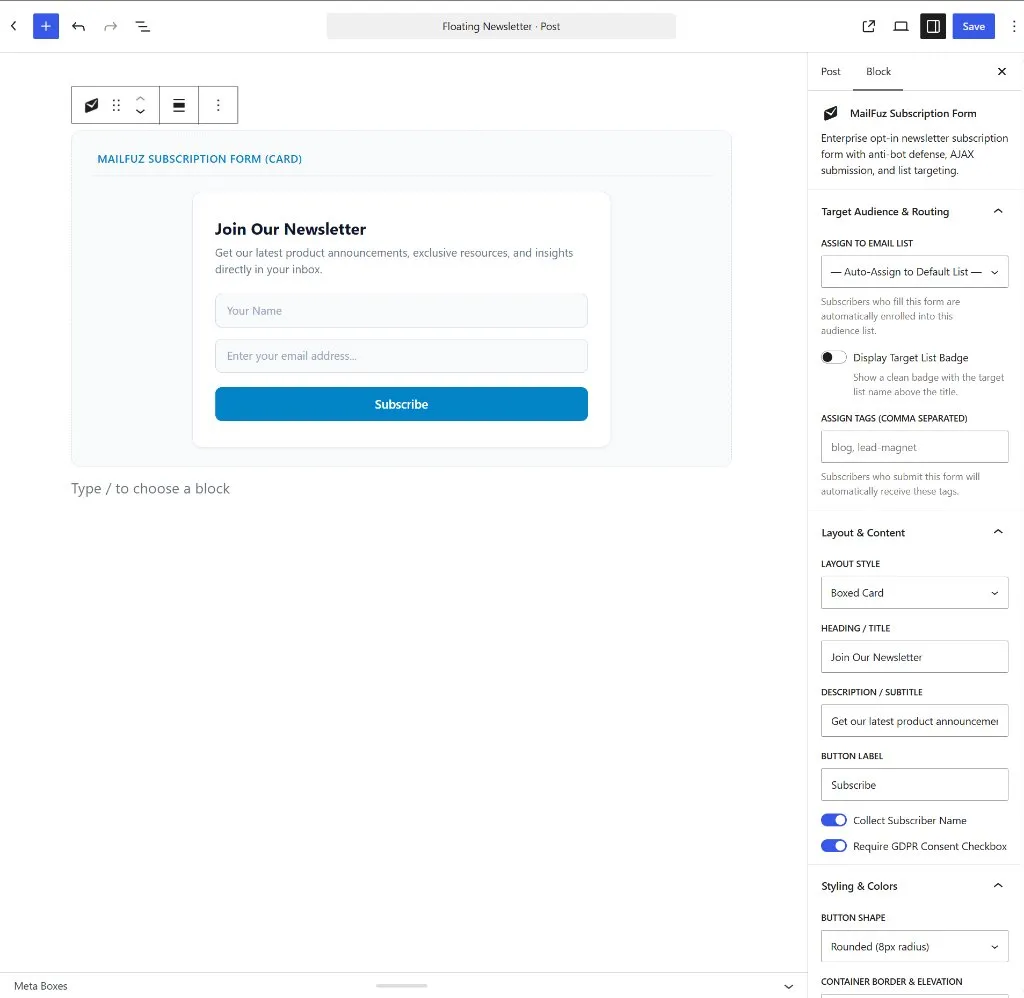
Adding the Block
Section titled “Adding the Block”- In the Block Editor, click the + block inserter.
- Search for
MailFuz,newsletter,subscribe, oropt-in. - Select MailFuz Subscription Form (under the MailFuz or Widgets category).
Block Inspector Settings & Customization
Section titled “Block Inspector Settings & Customization”The block sidebar is organized into three intuitive control panels:
A. Target Audience & Routing
Section titled “A. Target Audience & Routing”- Assign to Email List: Select the specific marketing list where new subscribers will be enrolled (e.g. Newsletter VIP, Product Beta, or Auto-Assign to Default List).
- Display Target List Badge: Toggle a clean topic badge displayed above the form heading.
- Assign Tags (Comma Separated): Attach custom lead tags (e.g.
blog, lead-magnet, ebook-download) automatically upon form submission.
B. Layout & Content
Section titled “B. Layout & Content”- Layout Style: Choose between three distinct presentation layouts:
- Boxed Card: Prominent centered card with heading, subtitle, input fields, and action button.
- Vertical: Stacked full-width form elements ideal for sidebars, footers, and narrow columns.
- Minimalist (Single Row): Ultra-compact horizontal row with inline email input and subscribe button, perfect for headers, navigation bars, and announcement strips.
- Heading / Title: Customizable headline text (e.g., Join Our Newsletter).
- Description / Subtitle: Supporting value proposition text.
- Button Label: Action button copy (e.g., Subscribe, Get Free Guide, Join VIP Club).
- Collect Subscriber Name: Toggle whether to show a first name field alongside email.
- Require GDPR Consent Checkbox: Enforces an explicit opt-in consent checkbox with privacy policy links.
C. Styling & Colors
Section titled “C. Styling & Colors”- Button Shape: Select between
Rounded (8px radius),Pill (Full radius), orSharp (Square edges). - Container Border & Elevation: Toggle border outlines, card background accents, and drop-shadow levels.
2. Public Shortcodes Reference
Section titled “2. Public Shortcodes Reference”For classic editor themes, custom PHP templates, and third-party page builders (Elementor, Beaver Builder, Divi), use the native shortcode:
[mailfuz_subscribe_form]Supported Shortcode Attributes
Section titled “Supported Shortcode Attributes”| Attribute | Default | Description | Example |
|---|---|---|---|
layout |
card |
Form layout: card, inline, or minimal |
layout="inline" |
list_id |
Default list | Specific MailFuz Email List ID to enroll contacts | list_id="3" |
title |
Join Our Newsletter |
Custom heading text | title="Get Weekly Insights" |
subtitle |
Default subtitle | Subheading description text | subtitle="No spam, ever." |
button_text |
Subscribe |
Action button label | button_text="Get Updates" |
tags |
None | Comma-separated lead tags | tags="landing-page, promo" |
show_name |
1 |
Collect subscriber name (1 or 0) |
show_name="0" |
Quick Examples
Section titled “Quick Examples”# Boxed Card with Custom Title and Campaign Tags[mailfuz_subscribe_form layout="card" title="Join Our VIP Club" tags="landing-page"]
# Single-Row Inline Form for Banners & Footers[mailfuz_subscribe_form layout="inline" button_text="Get Updates"]
# Minimalist Layout for Compact Sidebars[mailfuz_subscribe_form layout="minimal"]3. Global Opt-In & Form Settings
Section titled “3. Global Opt-In & Form Settings”Configure default form behaviors under MailFuz → Settings → Opt-In & Signups:
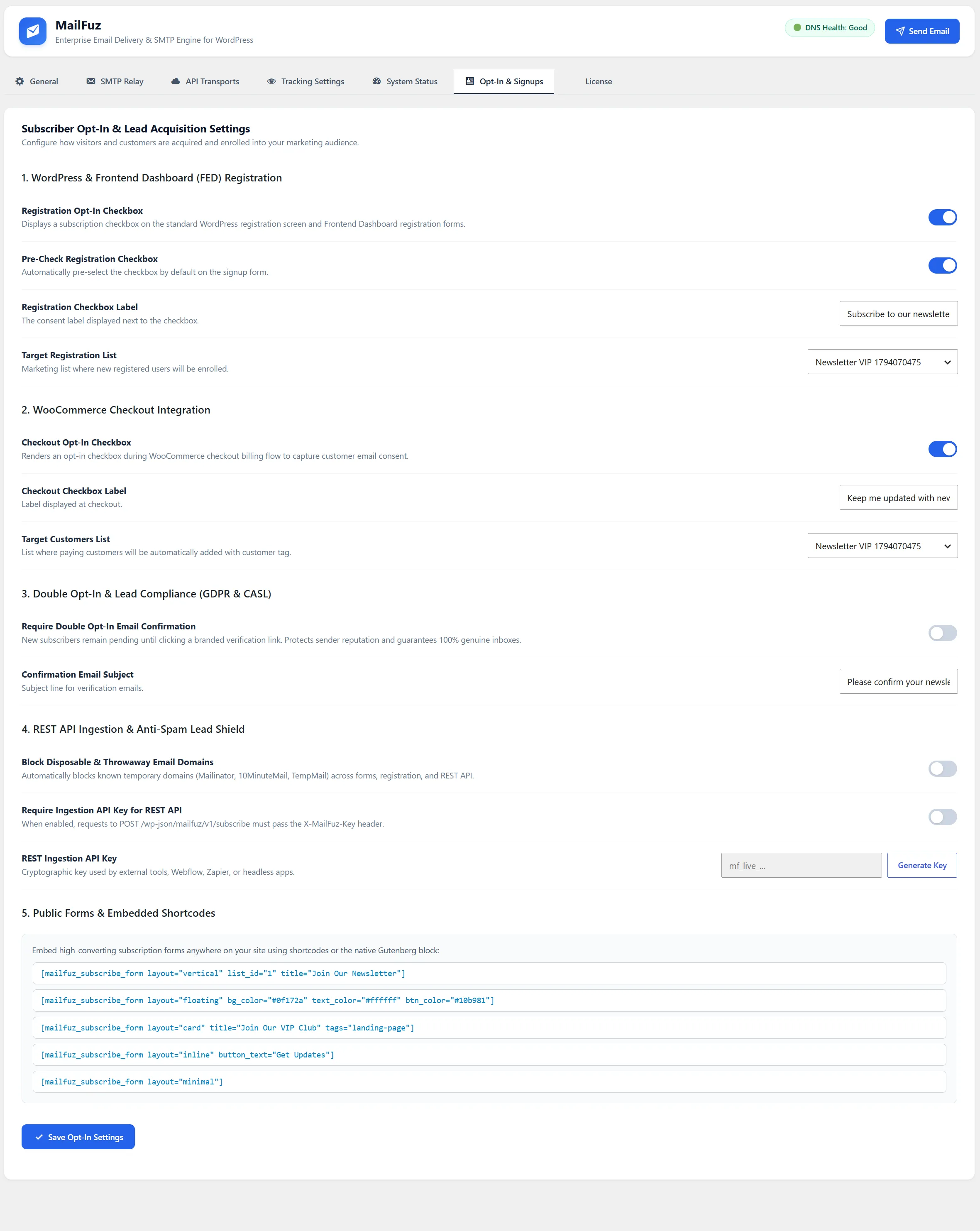
- Anti-Bot Protection: Built-in cryptographic nonce verification and invisible honeypots block spam bots without user puzzles.
- Double Opt-In Routing: When enabled globally, new signups receive a confirmation email before status transitions to active
subscribed.