
Broadcast Campaigns & Multi-List Dispatch
Broadcasts in MailFuz Pro allow marketers to dispatch one-time announcements, newsletters, promotional campaigns, or product updates across single or multiple email lists with automated server-side recipient deduplication.
Broadcast Campaigns Dashboard
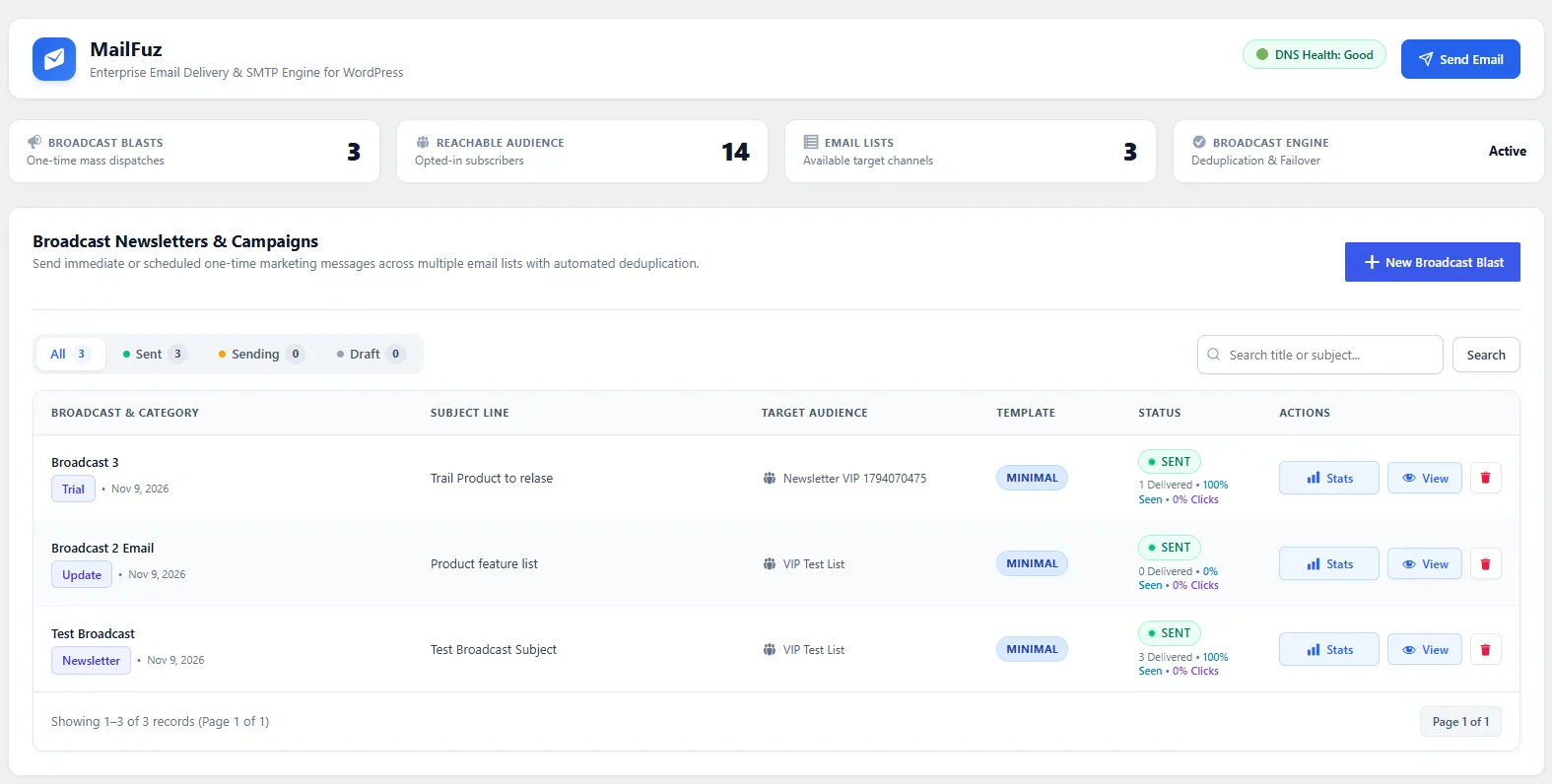
Section titled “Broadcast Campaigns Dashboard”Navigate to WP-Admin → MailFuz → Broadcasts (admin.php?page=mailfuz-broadcasts):
Broadcast Table Metrics
Section titled “Broadcast Table Metrics”- Campaign Title & Category: Name and categorization of the campaign.
- Target Lists: Badges indicating which audience channels received the broadcast.
- Delivery Status: Draft, Scheduled, Dispatched, or Sending in Queue.
- Sent Reach: Total count of unique recipients delivered.
- Open Rate (%): Percentage of unique recipients who opened the message.
- Click-Through Rate (%): Percentage of recipients who clicked links.
- Actions: Edit draft, duplicate blast, or click Stats to view the deep campaign analytics report.
Creating & Scheduling a Broadcast Blast
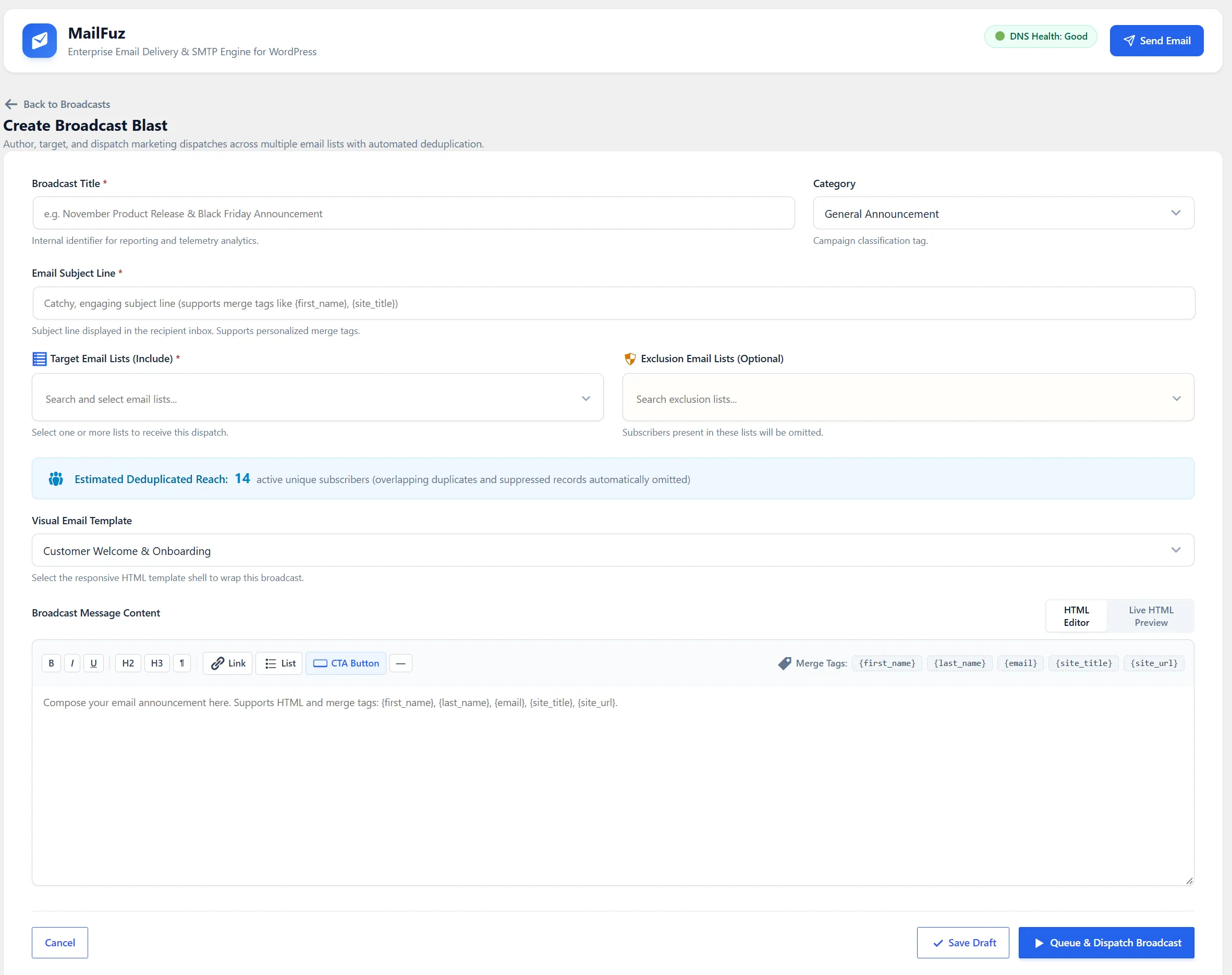
Section titled “Creating & Scheduling a Broadcast Blast”Click + New Broadcast Blast to open the broadcast composer modal:
Step-by-Step Composer Workflow
Section titled “Step-by-Step Composer Workflow”- Broadcast Title: Internal reference name for campaign reporting.
- Category: Assign to an audience category.
- Subject Line: Compelling subject line supporting dynamic merge tags (
{first_name},{site_title}). - Preview Text (Preheader): Teaser snippet shown in Gmail/Outlook before the email is opened.
- Target Email Lists: Select one or multiple lists. MailFuz automatically calculates the Estimated Deduplicated Reach in real time.
- Exclusion Lists: Optionally select lists whose subscribers must be excluded from this blast.
- Select Email Template: Choose your crafted responsive template from the Visual Studio library.
- Dispatch Mode:
- Send Now: Queues the broadcast for immediate transmission.
- Schedule for Later: Sets an atomic UTC timestamp for future delivery.
- Save as Draft: Persists the campaign configuration for later review.
Automated Server-Side Deduplication
Section titled “Automated Server-Side Deduplication”When targeting overlapping lists (for example, a contact belonging to both Newsletter and VIP Customers):
- MailFuz executes an authoritative SQL
DISTINCTquery across list association tables. - Guarantees that each email address receives exactly one message.
- Automatically excludes all unsubscribed or suppressed (
is_suppressed = 1) contacts. - Stamps each message with RFC 8058 compliant one-click list-unsubscribe headers.